


EZPass New Hampshire is the fastest way to pay tolls on Granite State highways without stopping at a booth. This system uses a small electronic transponder mounted on your windshield that talks to overhead sensors. The sensor reads your transponder, deducts the toll, and lets you drive on without slowing down. The NH E-ZPass program is run by the New Hampshire Department of Transportation and links to toll roads in New Hampshire plus many other states through a network called E-ZPass interoperability.
Drivers in New Hampshire and visitors from nearby states rely on EZPass NH every day. The system covers toll plazas on I-95, the Everett Turnpike, the Spaulding Turnpike, and several other state-managed roads. You can open an account online, add money, check your balance, and update your vehicle list from any phone or computer. This guide walks you through every step of the NH E-ZPass login process, account setup, payment options, troubleshooting, and account management so you can avoid violations and save time.
What Is EZPass New Hampshire and How Does It Work?
EZPass New Hampshire is an electronic toll collection system. It replaces the old cash lanes where you had to stop, hand over money, and wait for change. With E-ZPass, a transponder in your car sends a signal to a reader in the toll lane. The reader logs the trip and deducts the correct toll from your prepaid balance or bills your linked payment method.
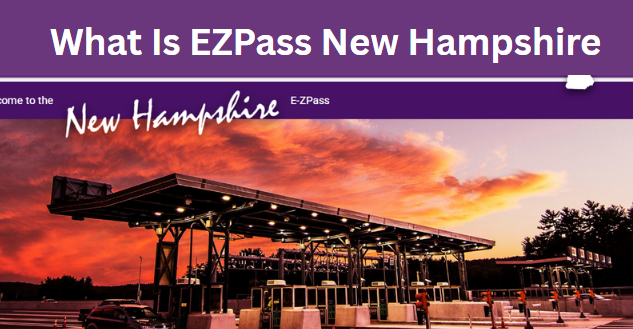
Official Website: www.ezpassnh.com
Customer Service Phone: 1-877-643-9727
Service Center Hours: Monday through Friday, 8:00 AM to 6:00 PM (Eastern Time)
Why NH Drivers Choose E-ZPass
E-ZPass users save time at New Hampshire toll plazas. Cash payers often wait in long lines during rush hour, weekends, and holidays. E-ZPass drivers use dedicated lanes that move much faster. The system also keeps a digital record of every trip, which helps with business expense reports and tax records. Many toll roads offer lower rates for E-ZPass users compared to cash or Pay-By-Plate rates. New Hampshire does not currently offer a resident discount program, but the time savings alone make E-ZPass worth it for daily commuters. Commercial fleets also benefit because the system tracks each vehicle and produces one monthly statement.
NH E-ZPass Login: How to Access Your Account Steps
Accessing your NH E-ZPass account takes less than two minutes once you have your login details ready. The online portal lets you view your balance, check transactions, update vehicle information, change your payment method, and download statements. Follow these four steps to log in without any issues.
Step 1: Navigate to the Official NH E-ZPass Website
Open your web browser and type www.ezpassnh.com into the address bar. Always type the URL yourself or use a bookmark you saved earlier. Fake login pages look real and steal usernames and passwords, so avoid clicking on links from emails or social media posts. The official site has a secure HTTPS connection, which you can verify by looking for the padlock icon next to the URL.
Step 2: Enter Your Username and Password
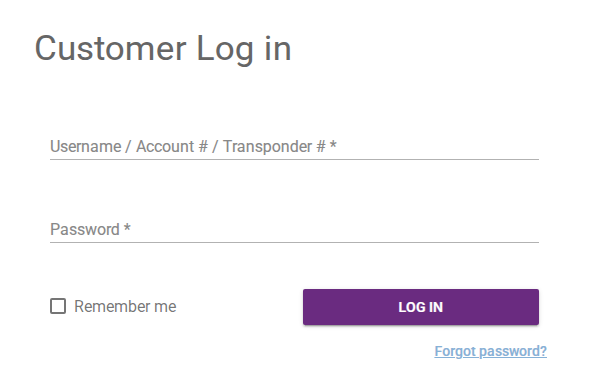
On the homepage, look for the login button or “Sign In” link, usually in the top right corner. Click it to open the login form. Type the username you created during registration in the first box. Type your password in the second box. Passwords are case-sensitive, so check that your caps lock key is off. If you cannot remember your password, click the “Forgot Password” link below the login form.
Step 3: Click Sign In to Access the Dashboard
After entering your credentials, click the “Sign In” button. The system checks your details and loads your account dashboard. The dashboard shows your current balance, recent transactions, and quick links for common tasks. If you typed your information correctly, you should see your account within a few seconds.
Step 4: Use the Help Section if You Run Into Problems
The official website has a Help or FAQ page that answers common questions about login, payments, transponders, and toll violations. If you cannot log in after a few tries, visit the Help section before calling customer service. Many issues, like a locked account or expired session, have simple fixes you can do on your own.
How to Sign Up for an NH E-ZPass Account
Creating an NH E-ZPass account is free, and you can finish the process in about 10 minutes. You need basic personal information, vehicle details, and a payment method. New accounts come with a starter transponder that arrives by mail within 5 to 7 business days. You can also pick up a transponder at a service center for same-day use.

Step 1: Log on to the NH E-ZPass Official Site
Go to www.ezpassnh.com and click the “Sign Up” or “Open an Account” button. This starts the registration process. The site is mobile-friendly, so you can sign up from your phone if needed.
Step 2: Choose Your Account Type
The system asks you to pick between three account types:
- Individual Account: Best for personal use. You can link multiple vehicles to one account.
- Business Account: Designed for fleets, company cars, and self-employed drivers. It allows tax-exempt status and itemized billing by vehicle.
- Anonymous Account: Allows you to use a transponder without linking it to your name. You fund it with cash at a service center. Discount plans and detailed statements are not available.
Step 3: Fill in Your Personal or Business Details
Enter your full legal name, mailing address, email, and phone number. Business accounts also require a company name, federal tax ID (if applicable), and billing address. Double-check your email address because the system sends a verification link there. A typo means you cannot activate your account.
Step 4: Add Vehicle and License Plate Details
Type the year, make, model, and license plate number for each vehicle you want to link. You can add up to 10 vehicles on a single account. If you drive a rental car regularly, add it temporarily and remove it when you return the vehicle.
Step 5: Choose a Payment Method
Pick one of the following options:
- Credit Card or Debit Card: The system automatically charges your card when your balance drops below a set threshold (usually $10).
- Bank Account (ACH): Money transfers directly from your checking account. There is no card fee.
- Cash or Money Order: Only available for prepaid accounts. You add money at a service center or by mail.
Step 6: Review and Accept the Terms and Conditions
Read the user agreement carefully. It explains fees, violation policies, and your responsibilities as an account holder. Check the box to accept the terms, then move to the final step.
Step 7: Complete Registration and Verify Your Account
Submit the form and check your email inbox for a verification message from NH E-ZPass. Click the link inside the email within 24 hours to activate your account. Once verified, log in to confirm everything works. Your transponder ships out the next business day.
Login Requirements for NH E-ZPass
Before logging in, make sure you have the right setup. The login portal works on most modern browsers and devices, but older technology can cause errors.
- Active Account: Your NH E-ZPass account must be active and in good standing. Suspended accounts cannot log in.
- Username and Password: You created these when you signed up. Keep them in a secure password manager.
- Stable Internet Connection: A weak Wi-Fi signal can cause timeouts. Use a wired connection or strong cellular data.
- Supported Browser: Chrome, Firefox, Safari, or Edge (latest versions). Internet Explorer is no longer supported.
- Updated Device: Your phone, tablet, or computer should run the latest operating system for best results.
- Cookies Enabled: The login portal uses cookies to keep you signed in. Disable private or incognito mode.
If you travel between New Hampshire and Massachusetts often, your NH E-ZPass account works on Massachusetts toll roads too. The same transponder is read at every toll plaza in both states. Just make sure your account has enough balance before you cross state lines.
NH EZPass Login Issues
Login problems happen to even experienced users. The good news is most issues have a quick fix. Below are the most common problems and how to solve each one.
Forgot Your Password
Click the “Forgot Password” link on the login page. Enter the email address tied to your account. The system sends a password reset link that is valid for 30 minutes. Open the link, create a new password, and log in. Your new password must be at least 8 characters long and include one number or special character.
Forgot Your Username
Click the “Forgot Username” link. Enter your email address or your NH E-ZPass account number. The system sends your username to your email within a few minutes. If you no longer have access to the email on file, call customer service at 1-877-643-9727 to verify your identity.
Account Locked After Too Many Failed Attempts
For security, the system locks your account after five wrong passwords in a row. The lock lasts 30 minutes. Wait it out or call customer service to unlock it faster. Going forward, reset your password so you do not get locked out again.
Browser Compatibility Problems
Outdated browsers can cause the login page to freeze or display errors. Update to the latest version of Chrome, Firefox, Safari, or Edge. Clear your cache and cookies before trying again. If the issue continues, try a different browser or device.
Expired Login Session
The portal logs you out automatically after 20 minutes of inactivity. This protects your account if you forget to log out on a shared computer. If your session expires, simply log back in with your username and password.
Internet Connection Issues
A weak or unstable connection causes login failures. Test your Wi-Fi or cellular signal. Restart your router if needed. Switch to a different network (like mobile hotspot) to see if the issue is with your internet provider.
Server Downtime
NH E-ZPass performs maintenance during off-peak hours, usually late at night or early morning. During these windows, the portal may be temporarily unavailable. Check the NH E-ZPass website or social media for maintenance alerts. Try again after the scheduled time ends.
Technical Glitches
Sometimes the portal has a temporary bug. Clear your browser cache, restart your device, and try again. If the problem persists for more than an hour, contact customer service to report the issue.
Unsupported Device or Operating System
Very old phones or tablets may not support the latest security features on the portal. Use a device that runs iOS 14 or Android 10 (or newer). Update your operating system if possible.
Types of NH EZPass Login Accounts
NH E-ZPass offers three account types to fit different needs. Each one has its own perks and limits. Pick the one that matches how you drive.
Individual Account
An individual account is the most common choice. It is perfect for daily commuters, families, and occasional road-trippers. You can link up to 10 vehicles to one account, including cars, motorcycles, and RVs. The portal keeps a record of every toll, so you can track spending and download statements for tax purposes.
Individual accounts qualify for automatic replenishment, so your balance never drops below the minimum. You get a monthly statement by email. If you lose your transponder, you can order a replacement online for a small fee.
Business Account
A business account is built for companies with fleets. It includes tax-exempt billing, detailed reports by vehicle or driver, and the ability to set spending limits per vehicle. Construction companies, delivery services, and trucking firms use business accounts to manage toll expenses across many vehicles. Business accounts can link unlimited vehicles. The portal lets you add or remove vehicles in bulk. You receive a single monthly invoice that lists every toll for every vehicle, which simplifies accounting.
Anonymous Account
An anonymous account lets you use E-ZPass without sharing your name or address. You fund it with cash at a service center or by money order through the mail. The transponder works at any toll plaza, but you cannot view your balance online or receive statements. Anonymous accounts are best for people who drive through toll plazas occasionally and want privacy. They do not qualify for automatic replenishment or online management.
Keeping Your NH EZPass Account Secure
Account security protects your money and personal information. Follow these tips to keep your NH E-ZPass account safe from hackers and unauthorized users.
- Use a Strong Password: Combine uppercase letters, lowercase letters, numbers, and special characters. Avoid birthdays or common words.
- Enable Two-Factor Authentication: If available, turn on this feature for an extra layer of security.
- Monitor Your Statements: Check your transaction history every month for charges you do not recognize.
- Avoid Public Wi-Fi: Do not log in to your account on unsecured networks like coffee shops or airports. Use your phone’s cellular data instead.
- Log Out on Shared Devices: Always click “Sign Out” when using a public or shared computer.
- Update Your Contact Info: Make sure your email and phone number are current so you receive security alerts.
Functionalities of the NH EZPass Login System
The online portal gives you full control over your account from anywhere. Here are the main tasks you can complete after logging in.
NH EZPass Payment Options
NH E-ZPass accepts several payment methods to fit different budgets and preferences. Choose the one that works best for your situation.
Credit Card or Debit Card
Linking a credit or debit card is the fastest and most popular option. When your balance drops below $10 (or the threshold you set), the system automatically charges your card to bring the balance back up to your chosen amount. Most major cards are accepted, including Visa, Mastercard, American Express, and Discover.
Bank Account (ACH Transfer)
Linking a checking account avoids card processing fees. The system transfers money directly from your bank to your E-ZPass account. It takes 2 to 3 business days for the transfer to complete, so plan ahead if you are close to your threshold.
Cash Payments
You can fund your account with cash at any NH E-ZPass service center. Bring your account number or transponder. You can also mail a check or money order to the address listed on the portal. Cash payments through the mail are not accepted for security reasons.
Prepaid vs. Postpaid Accounts
Most NH E-ZPass accounts are prepaid. You load money onto the account before using it. Postpaid accounts bill you after each toll, but they are only available to business customers with strong credit. Prepaid accounts give you more control over your spending.
How to Use E-ZPass on New Hampshire Highways
Using E-ZPass on New Hampshire toll roads is simple once your account is set up and your transponder is mounted. Follow these steps for a smooth experience.
Mount Your Transponder Correctly
Place the transponder on the inside of your windshield, about 2 inches below the rearview mirror mount. The transponder should be horizontal, with the label facing you. Clean the windshield with rubbing alcohol before attaching the mounting strips. Most transponders come with adhesive strips already applied.
Drive Through E-ZPass Lanes
Look for lanes marked “E-ZPass Only” or “E-ZPass Accepted.” These lanes have overhead sensors that read your transponder. Keep your speed under 25 mph as you pass through the toll plaza. A green light or no sound means the toll went through. A yellow or red light means there is a problem.
Check Toll Rates Before You Travel
Toll rates change occasionally. Check the NH E-ZPass website or the New Hampshire DOT website for current rates. Knowing the price ahead of time helps you keep enough money in your account.
Use E-ZPass Across State Lines
Your NH E-ZPass transponder works in 17 other states, including Maine, Massachusetts, New York, New Jersey, Pennsylvania, Delaware, Maryland, Virginia, West Virginia, Ohio, Indiana, Illinois, Kentucky, North Carolina, and Florida (via SunPass). One transponder covers all these states. You do not need a separate account for each.
NH E-ZPass Service Centers and Appointments
NH E-ZPass has several service centers across the state. These centers handle account setup, transponder pickup, cash payments, and account disputes. Most centers do not require an appointment, but calling ahead saves wait time.
| Location | Address | Phone | Hours |
|---|---|---|---|
| Concord Service Center | 54 Regional Drive, Concord, NH 03301 | 1-877-643-9727 | Mon-Fri: 8 AM – 5 PM |
| Nashua Service Center | 1100 Elm Street, Nashua, NH 03060 | 1-877-643-9727 | Mon-Fri: 9 AM – 4 PM |
| Hampton Toll Plaza | I-95, Hampton, NH 03842 | 1-877-643-9727 | Mon-Sat: 7 AM – 6 PM |
| Hooksett Toll Plaza | I-93, Hooksett, NH 03106 | 1-877-643-9727 | Daily: 6 AM – 8 P |
NH E-ZPass Mobile App: Login on the Go
The NH E-ZPass mobile app lets you manage your account from your phone. The app is free to download and works on both iOS and Android devices. It offers the same features as the website portal in a mobile-friendly format.
Step 1: Download the App
Open the App Store on iPhone or Google Play on Android. Search for “NH E-ZPass.” Download the official app published by the New Hampshire Department of Transportation. Avoid third-party apps that claim to manage your account.
Step 2: Log In with Your Account Details
Open the app and enter the same username and password you use on the website. The app saves your login for future use, so you only need to enter your password once (unless you log out).
Step 3: Access Key Features
The app dashboard shows your balance, recent transactions, and account settings. Tap any section to see more details. You can add funds, update vehicle information, and contact support directly from the app.
Step 4: Enable Notifications
Turn on push notifications to receive alerts when your balance is low, when a toll posts, or when there is account activity. Notifications help you stay on top of your account without opening the app every day.
Benefits of Using NH E-ZPass Login
Logging in to your NH E-ZPass account regularly keeps your toll experience smooth and stress-free. Here are the key benefits.
- Save Time: E-ZPass lanes move faster than cash lanes, especially during rush hour.
- Save Money: Many toll roads charge lower rates for E-ZPass users compared to Pay-By-Plate rates.
- Avoid Violations: A funded E-ZPass account means no missed tolls, no late fees, and no collection notices.
- Track Spending: Online statements make it easy to track toll expenses for work or tax purposes.
- Travel Anywhere: One transponder works in 17 states, from Maine to Florida.
- Manage Online: Add vehicles, update payment info, and check your balance anytime from your phone or computer.
NH E-ZPass Discount Plans
New Hampshire does not currently offer a resident discount program for E-ZPass. However, the system still saves money compared to Pay-By-Plate rates, which are higher on most toll roads. Out-of-state drivers can use their home state E-ZPass account in New Hampshire at the same rate as NH residents.
Commercial fleets may qualify for volume discounts through the business account program. Contact NH E-ZPass customer service for details on fleet pricing and contract options.
How to Resolve a Toll Violation Notice
A toll violation happens when you pass through a toll plaza without a working transponder or with an empty account. The system takes a photo of your license plate and mails a violation notice to the registered owner of the vehicle. Here is how to handle a violation if you get one.
Read the Notice Carefully
The notice explains the date, time, location, and amount due. It also lists a deadline and instructions for paying or disputing the toll.
Pay Online or by Mail
The fastest way to pay is through the NH E-ZPass website or mobile app. You can also mail a check to the address printed on the notice. Pay before the deadline to avoid late fees.
Dispute if You Believe the Notice Is Wrong
If you had a working transponder or E-ZPass account at the time of the toll, you can dispute the violation. Submit proof, such as a receipt or account statement, through the online dispute form or by mail. The system reviews disputes within 30 days.
Contact Customer Service for Help
If you have questions about a violation, call 1-877-643-9727. Customer service can look up your account, explain the charge, and help you resolve the issue.
Pay-By-Plate NH: What It Is and How It Works
Pay-By-Plate is an alternative to E-ZPass for drivers who do not have a transponder. The system uses cameras to photograph your license plate and mail a bill to the registered owner. Pay-By-Plate rates are higher than E-ZPass rates, so signing up for E-ZPass saves money in the long run. If you receive a Pay-By-Plate bill, you can pay it online at www.ezpassnh.com, by mail, or by phone. Pay before the due date to avoid late fees. Repeated violations can result in registration holds or court action, so address every bill promptly.
Support and Assistance for EZPass Login NH
NH E-ZPass offers multiple ways to get help when you need it. Choose the option that fits your situation.
- Phone Support: Call 1-877-643-9727. The line is open Monday through Friday from 8 AM to 6 PM Eastern Time.
- Email Support: Send a message through the contact form on the NH E-ZPass website. Replies usually arrive within 1 to 2 business days.
- Live Chat: Look for the chat icon on the website. Live agents are available during business hours.
- FAQs: The Help section on the website covers common questions about accounts, payments, transponders, and violations.
- Service Centers: Visit a center in Concord, Nashua, Hampton, or Hooksett for in-person help.
Pay-By-Plate with NH E-ZPass
Pay-By-Plate and E-ZPass work together. If you forget your transponder at home or it fails to read, the system may bill you through Pay-By-Plate instead. The toll amount is higher, but you avoid a full violation. To switch from Pay-By-Plate bills to E-ZPass, simply open an E-ZPass account and link your license plate. Future tolls will deduct from your E-ZPass balance instead. You can also pay Pay-By-Plate bills through your E-ZPass account. Log in, go to the “Pay Violations” section, and enter the bill number. This combines all your toll activity in one place.
Special Toll Lanes and Express Access with NH E-ZPass
Most toll plazas in New Hampshire have dedicated E-ZPass lanes. These lanes have sensors mounted overhead that read your transponder as you drive through. Some locations offer “Express E-ZPass” lanes that allow you to drive at highway speed without stopping. These lanes are marked with clear signs. E-ZPass users can also use the high-speed lanes at the Hampton toll plaza on I-95. These lanes do not require you to slow down, which saves time during heavy traffic. Make sure your transponder is mounted properly and your account has a positive balance before using high-speed lanes.
NH E-ZPass with Rental Cars
If you rent a car and want to use E-ZPass, you have two options. First, you can add the rental car’s license plate to your existing E-ZPass account temporarily. Log in, go to “Manage Vehicles,” and add the plate along with the rental period. Remove the plate when you return the car. Second, some rental car companies offer their own toll programs. These programs charge a daily fee plus the cost of each toll. They are convenient but more expensive than using your own E-ZPass account. Check the rental company’s toll policy before driving through any toll plaza.
Installing Your Transponder Correctly
Correct transponder installation is critical for reliable toll reading. Follow these steps for the best results.
- Clean the inside of your windshield with rubbing alcohol. Let it dry completely.
- Peel the backing off the adhesive strips on the transponder mount.
- Place the transponder on the windshield, about 2 inches below the rearview mirror mount. Center it horizontally.
- Press firmly for 30 seconds to make sure it sticks well.
- Wait 24 hours before driving through a toll plaza to let the adhesive set.
If your transponder does not read at a toll lane, check the position. The transponder should be level and not blocked by the rearview mirror or window tint. Some vehicles with metallic tint or heated windshields may need an external transponder mounted on the license plate bracket.
Closing or Transferring Your NH E-ZPass Account
You can close your NH E-ZPass account at any time. The process is simple and free. Here is what to do.
- Log in to your account and make sure your balance is zero.
- Remove all vehicles from your account.
- Return your transponder to a service center or by mail (if required by your account type).
- Submit a closure request through the website or by calling customer service.
- The system refunds any remaining balance to your original payment method within 30 days.
To transfer an account to another person, contact customer service. You will need to provide the new account holder’s information. Both parties must sign a transfer form. The process takes about 2 weeks.
If a spouse passes away, you can transfer the account into your name. Call customer service and provide a death certificate and proof that you are the executor or surviving spouse.
NH E-ZPass for Special Use Cases
NH E-ZPass supports a wide range of vehicles and drivers beyond standard passenger cars. Here are some special cases.
Motorcycles
Motorcycles can use E-ZPass lanes in New Hampshire. The transponder should be mounted on the front fairing or in a tank bag. Make sure it is visible to the overhead sensor. Some motorcycle riders use a portable transponder that they transfer between bikes.
Trucks and Commercial Vehicles
Trucks with more than two axles pay higher toll rates based on weight and number of axles. The transponder must be linked to a business account to receive proper billing. Commercial vehicles from out of state can use their home-state E-ZPass at NH rates.
RVs and Trailers
RVs and vehicles pulling trailers pay tolls based on the number of axles. Some toll roads charge per axle, so a vehicle with a trailer pays more than a single vehicle. Add the trailer as a separate vehicle on your account or contact customer service for guidance.
Emergency Vehicles
Police, fire, and ambulances do not pay tolls in New Hampshire. These vehicles use special transponders that signal the system to waive the toll. The transponders are issued by the state agency, not through the public E-ZPass program.
Comparing EZPassNH with Other Toll Systems
E-ZPass is the largest electronic toll network in the United States. It covers 17 states and serves more than 60 million drivers. Other toll systems, like SunPass in Florida, FasTrak in California, and TxTag in Texas, serve smaller regions.
The biggest advantage of E-ZPass is interoperability. One account and one transponder work across state lines. If you travel from New Hampshire to Florida, you can use the same NH E-ZPass without opening a new account. Drivers with SunPass or TxTag must open a separate E-ZPass account to use toll roads in the Northeast.
Frequently Asked Questions
Below are answers to common questions drivers ask about EZPass New Hampshire. These cover account setup, login issues, payments, and transponder use.
What is E-ZPass and how does it work?
E-ZPass is an electronic toll collection system that lets drivers pay tolls without stopping. A small transponder mounted inside your windshield sends a signal to a reader at the toll plaza. The reader logs the trip and deducts the toll from your prepaid account. The whole process takes less than a second, so you can drive through the toll lane at normal speed without waiting in line.
Where can I use E-ZPass?
You can use E-ZPass on toll roads, bridges, and tunnels in 17 states, including New Hampshire, Maine, Massachusetts, New York, New Jersey, Pennsylvania, Delaware, Maryland, Virginia, West Virginia, Ohio, Indiana, Illinois, Kentucky, North Carolina, and Florida (through SunPass). Major routes include the New York Thruway, Pennsylvania Turnpike, New Jersey Turnpike, and the entire New Hampshire toll road network.
Is there someplace else I can mount my E-ZPass other than the windshield?
Yes. If your windshield has metallic tint or a heated coating that blocks the signal, you can mount the transponder on your front license plate bracket using an external tag holder. The transponder must have a clear line of sight to the toll reader. Check the mounting instructions that came with your transponder or contact NH E-ZPass customer service for guidance.
Where are the customer service centers located and what are their hours?
NH E-ZPass has service centers in Concord, Nashua, Hampton, and Hooksett. Most centers are open Monday through Friday from 8 AM to 5 PM. The Hampton and Hooksett toll plaza locations have extended hours, including weekends. All centers close on New Hampshire state holidays. You can find the exact address and hours for each center on the NH E-ZPass website.
What does the “Low Bal$” message in the toll lane mean?
The “Low Bal$” message means your account balance has dropped below the minimum threshold. The system still lets you through the toll lane, but you need to add funds soon to avoid a violation. Log in to your account, add money through the payment section, and the message will stop appearing once your balance is back above the threshold.
My spouse passed away. Can I transfer the E-ZPass account into my name?
Yes. Contact NH E-ZPass customer service at 1-877-643-9727 and let them know about the situation. You will need to provide a copy of the death certificate and proof that you are the surviving spouse or estate executor. The account will be transferred to your name, and you can continue using the same transponder without interruption.
What fees can I be charged?
NH E-ZPass does not charge a monthly fee for individual accounts. Business accounts may have a small annual fee. You may be charged a fee for a lost or damaged transponder replacement, which is typically $10 to $25. Late payment fees apply to unpaid violations. There are no fees for adding money to your account through a bank account, but credit card transactions may include a small processing fee.
How do I sign up for E-ZPass?
Visit www.ezpassnh.com and click the “Sign Up” button. Fill out the online form with your personal details, vehicle information, and payment method. Submit the form, verify your email address, and your transponder will arrive by mail within 5 to 7 business days. You can also sign up in person at any NH E-ZPass service center.
How can I pay for my E-ZPass account?
You can pay for your E-ZPass account by linking a credit card, debit card, or checking account for automatic replenishment. You can also make one-time payments online, by phone, or at a service center. Cash payments are accepted at service centers. Payments by mail (check or money order) are also accepted.
